How to print bookmarks front and back
Flip on the edge that runs the same way as the bookmarks. Print one test sheet, hold it to the light, and check the lines before you print the rest.
Which edge keeps the back upright?
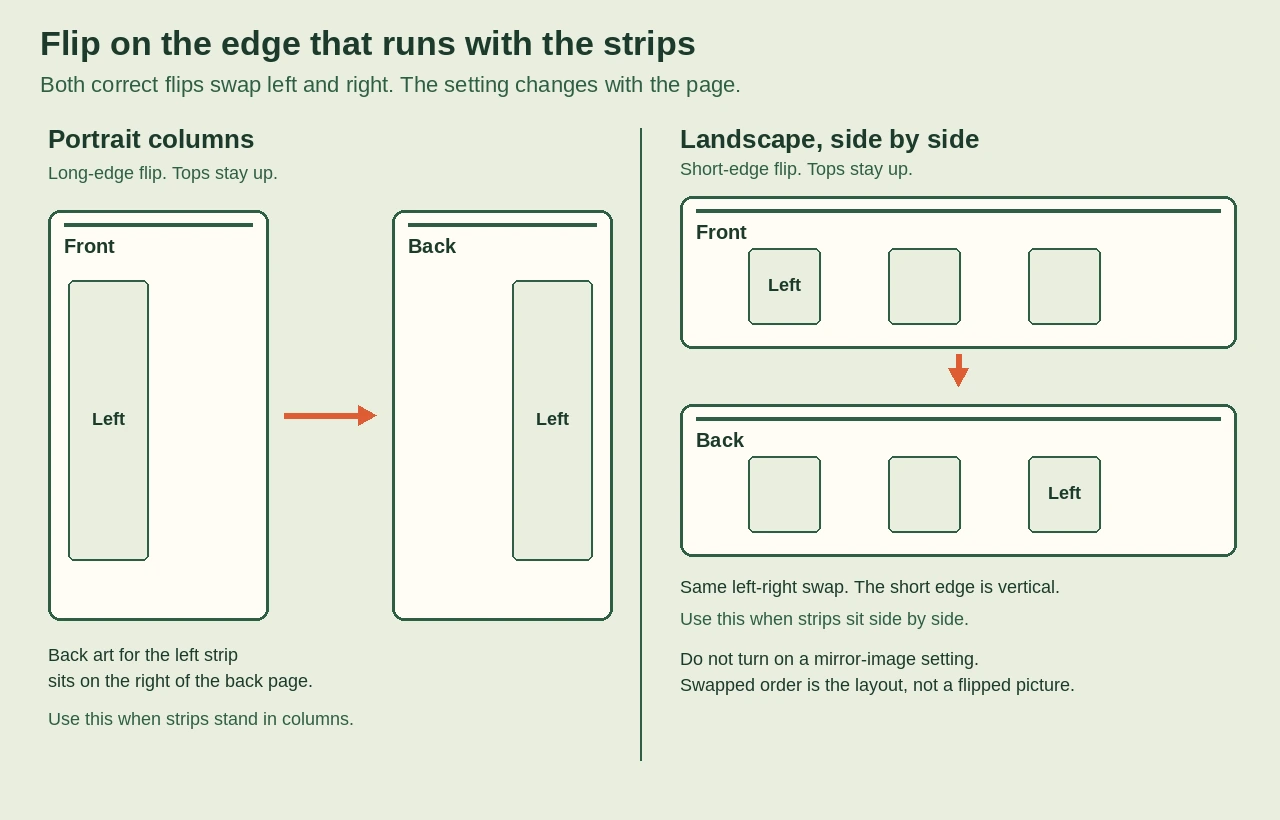
Flip on the edge that runs the same way as the bookmarks. Strips standing in columns on a portrait page need the long edge. That turn keeps the top of the back at the top of the front, and left and right trade places. Strips side by side on a landscape page need the short edge. On that sheet the short edge runs with the strips, so the tops stay up and the columns still trade places. A short-edge flip on a portrait page swaps top and bottom. The back then sits upside down on each strip. Open the print dialog and choose print on both sides. The flip choice usually sits beside that menu, under layout, finishing, or features. Pick the edge that matches the strips. Confirm that choice on a cheap sheet before you use the card you want to keep. If the dialog has no flip choice, the printer prints one side only, and the next section is the reload.
The dialog lists flip on the long edge and flip on the short edge. Sheet size does not pick the edge. The direction of the strips does.
What if the printer has no duplex unit?
A printer with no duplex unit can still print both sides. It prints the first side and stops. Flip the sheet over and put it back in the printer before you send the second side. Follow the picture your printer shows. Learn that reload on a plain sheet, and save the stiff sheet until the back lines up. Wait until the printer has fully stopped before you touch the paper. Tap the stack on the table so the edges meet. A sheet that goes in crooked prints a crooked back, even when the flip edge is right. If the printer grabs two sheets, start over on a fresh sheet. Do not try to save a half-printed pair. A driver popup, when the printer shows one, overrides a general reload direction. If the second pass prints on the same face, the sheet went in the wrong way up. Load a new sheet.
How do you check one test sheet?
Mark each strip with a different letter before you trust the file. Print the front, then the back, with the flip you mean to keep. Hold the sheet to a window or a lamp. Each letter should sit behind its own strip, and it should read the right way up. An upside-down letter means the flip edge is wrong. A letter that is upright but slid off its strip means the edge is already right. Look at the reload and the size next, not at the flip. Do not cut the sheet, and do not print the rest, until that one sheet passes. A faint miss still matters if you write on the back. A line that misses the front rectangle is a line you cannot use.
A numbered test page can show the same miss. Letters are clearer on a strip you will cut. On a sheet with three strips, mark them A, B, and C from left to right. After a long-edge flip, A still reads the right way up, but it lands on the right-hand strip unless the back was laid out swapped. If the back was laid out swapped, A stays behind A. One repeated mark cannot show that difference.
How do you fix a missed back?
Name the error on the test sheet before you change a setting. If the letters are upside down, switch the edge and print another test. If every strip is off by the same amount, reload the sheet square against the guide and reprint the test. Do not change the flip for that miss. Change one setting at a time. If only one strip is off, check where that strip sits in the file before you touch the dialog. You can leave a little extra border in the art if you want room for a small miss. That border is a choice, not a required fix. Match the margins on both pages, then reprint the test.
Print both sides at 100% size. The home printing page covers that size setting after this flip test, not instead of it.
Do several bookmarks need a mirrored back?
A sheet with more than one bookmark needs the back strips in swapped order, because the printer flips the whole sheet, not each strip. Mirrored means that swapped order. It does not mean the picture is flipped, so leave any mirror-image print setting off. For columns on a portrait page, the long-edge flip swaps left and right. The back art for the left strip sits on the right of the back page. Side-by-side strips on a landscape page use the short edge, and that flip makes the same left-and-right swap. A file that already shows that swap in the viewer is ready. Print it as it is. Cutting does not move art onto the right rectangle. Trust the sheet you held to the light if the viewer and the paper disagree.
Use the sheet-size page when the file and the paper in the tray are different sizes.
You already have the flip and the light test for a file you own. If you would rather not build that file yourself, print All three at home instead.