What weight paper for bookmarks?
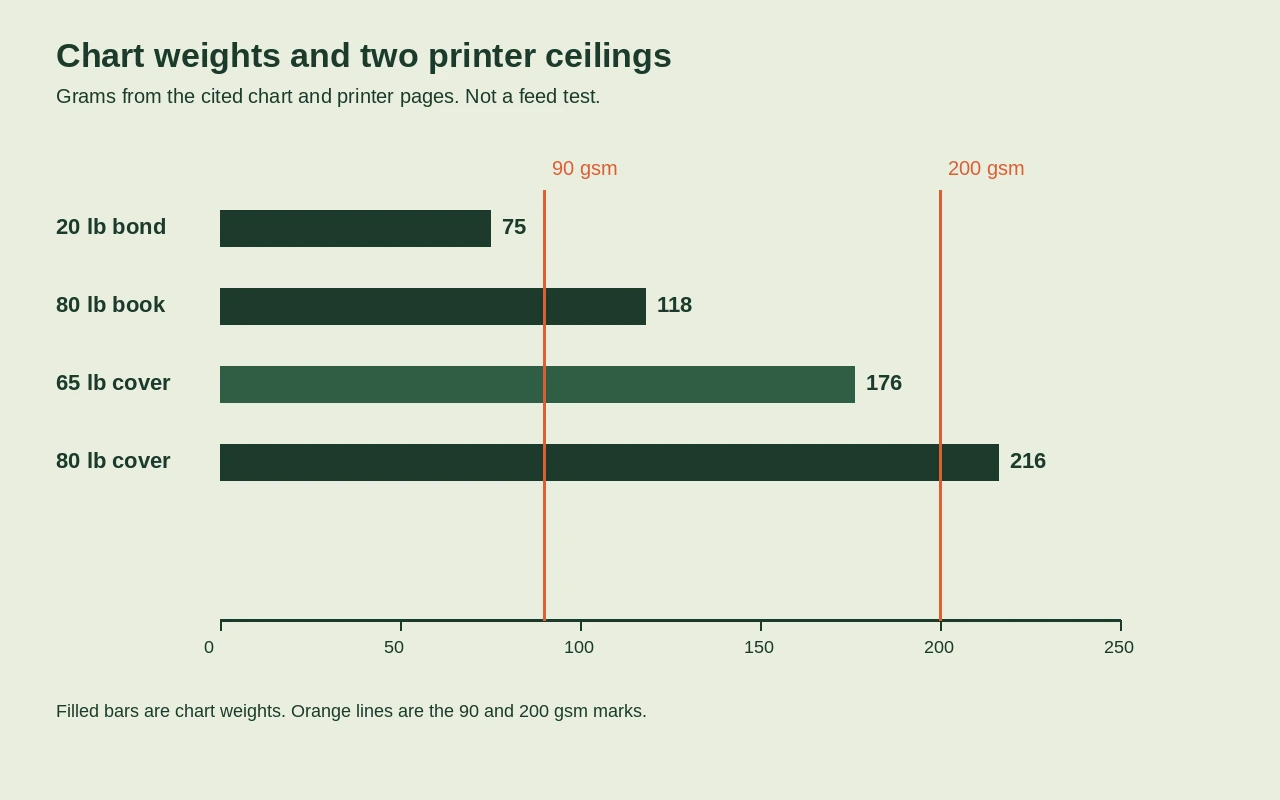
Use 65 lb cover, listed at 176 gsm, when your printer manual allows that weight. If the manual stops lower, or warns against cardstock, use the heaviest sheet it names and test one sheet.
How do cover and book weights differ?
Cover and book are different grades, so the same pound number on each is a different sheet. Each grade is weighed on its own standard sheet size, and book paper's is the biggest, which is why book paper is much lighter than cover at the same number. 80 lb book is 118 gsm. 80 lb cover is 216 gsm. For a bookmark, buy cover, not book or bond. Check the grade on the label as well as the pounds, because a pound figure with no grade could be any of the three sheets. The gram figure is the safer one to compare, since it measures every grade on the same square meter.
A basis weight is the weight of 500 sheets cut to that grade's own size. Bond uses a 17 by 22 inch basis, book paper 25 by 38 inches, and cover 20 by 26 inches.
| Weight | Equivalent | Source |
|---|---|---|
| 20 lb bond | 75 gsm | Case Paper |
| 80 lb book | 118 gsm | Case Paper |
| 65 lb cover | 176 gsm | Case Paper |
| 80 lb cover | 216 gsm | Case Paper |
| 100 lb cover | 271 gsm | Case Paper |
If the pack gives only pounds and names the grade, look it up in the table first.
What can a home printer feed?
Open the manual for your exact model and find the paper-weight limit. The first rows below are for the Brother MFC-J1205W and the MFC-J1215W. A manual that allows 200 gsm, and does not ban cardstock, can take 65 lb cover at 176 gsm, while 80 lb and 100 lb cover are past that ceiling. A pack can clear the gram limit and still be too thick for the tray. Plain paper on those Brother models is 3 to 6 mil, or 0.08 to 0.15 mm, and inkjet paper is allowed up to 10 mil, or 0.25 mm. Most A4 Epson Stylus-generation printers add a second rule: above plain-paper weights, they take only genuine Epson media, not a third-party pack.
| Printer | Paper | Limit | Source |
|---|---|---|---|
| Brother MFC-J1205W and MFC-J1215W | Plain paper | 64 to 120 gsm (17 to 32 lb) | Brother |
| Brother MFC-J1205W and MFC-J1215W | Inkjet paper | 64 to 200 gsm (17 to 53 lb) | Brother |
| Brother MFC-J1205W and MFC-J1215W | Cardstock | Most cardstock is at least 65 lb | Brother |
| Most A4 Epson Stylus-generation models | Third-party plain paper | 64 to 90 gsm | Epson |
| Most A4 Epson Stylus-generation models | Genuine Epson media | up to 300 gsm, some models up to 255 gsm | Epson |
On an Epson whose driver lists Card Stock settings, pick the setting whose range holds the pack's gsm.
| Pack weight | Epson paper-type setting | Source |
|---|---|---|
| 91 to 105 gsm | Card Stock 1 | Epson |
| 106 to 135 gsm | Card Stock 2 | Epson |
| 136 to 160 gsm | Card Stock 3 | Epson |
| 161 to 250 gsm | Card Stock 4 | Epson |
65 lb cover at 176 gsm belongs on the heaviest of those settings.
Is matte or glossy better for notes?
Write notes on an uncoated or matte back. Rule one line on the back of a spare sheet before you print a stack. If the ink beads or smears, switch to uncoated or matte cover. Run that line on the sheet you would buy, because another pack can take a pen and still tell you nothing about this one. A sheet the manual will feed can still refuse a ballpoint on the back, and a pen test says nothing about the tray. Test the back, where the notes go, and if you will also write a title on the front, test that side too before you print the rest.
A coated sheet gets a clay surface after it is made, for a smoother finish and more opacity. That surface is for the printed face, not a promise that your pen will mark it.
Check the pack's gsm against the manual, then print one sheet and stop if it jams. If your printer is one of those two Brother models, do not buy cover stock. On a Stylus-generation Epson, third-party paper stops at 90 gsm, so buy genuine Epson media within your model's limit, up to 300 gsm or 255 gsm on some models, or use a copy shop.
The bookmark size page matches a strip to the book in your hand. The paper-type setting is on the home printing page.
A chart and a manual do not prove your pack will feed, and these pages do not test your pen on the back.
You are matching a pack to the manual. All three holds reading trackers you print at home.
Sources
- Case Paper (published 2024-06-23; retrieved 2026-09-28)
- Prepressure (retrieved 2026-09-28)
- Prepressure (published 2020-08-01; retrieved 2026-09-28)
- Brother (retrieved 2026-09-28)
- Epson (retrieved 2026-09-28)
- Epson (retrieved 2026-09-28)